30 Days of Automated Competitor Tracking: What You Actually Get
Synopsis
Week-by-week walkthrough of Pagezii in practice. Week one: setup and first alerts. Week two: first weekly summary. Week three: pricing change caught and acted on. Week four: first PDF report. Ends with what to expect at 60 and 90 days.
What You Actually Get From Automated Competitor Tracking
Automated competitor tracking removes the manual checking entirely — but the real question is what you get back in return. Here is a week-by-week account.
The hardest question to answer about any new tool is not "what does it do" but "what do I actually get from it in practice."
This post walks through a realistic 30-day experience with Pagezii — not a best-case scenario, not a cherry-picked success story, but a week-by-week account of what the tool produces and what you do with it.
By week three, most teams see a clear ROI from automated competitor tracking: a single timely alert often protects more revenue than a full year of Pagezii fees.
Week One: Setup and First Alerts
Setup takes less time than most teams expect. You add competitor URLs, select which pages to monitor for each one, and set your alert preferences. Most users are done in under 10 minutes.
In week one, add fewer pages per competitor, not more. Start with pricing and features. You can expand later once you know which alerts are actually useful to your workflow.
For the first day or two, Pagezii builds a baseline. It crawls the pages you have added and establishes the starting state. This baseline is what future changes are compared against.
Within the first 48 hours, most users receive their first alert. It is almost always minor — a small copy change on a homepage, a pricing page update, a new blog post. Minor changes are still useful. They tell you the monitoring is working and they start building the change history that becomes more valuable over time.
By the end of week one, you have a functioning monitoring system, a starting baseline for each competitor, and probably two to four alerts covering minor changes.
The main thing to calibrate in week one is alert sensitivity. If you are getting alerted on changes that are not useful to you, adjust the settings. If you are not getting enough alerts, check that you have selected the right pages.
Week Two: The First Weekly Summary
On Monday of week two, the first weekly summary arrives. This is where Pagezii's value becomes clearer.
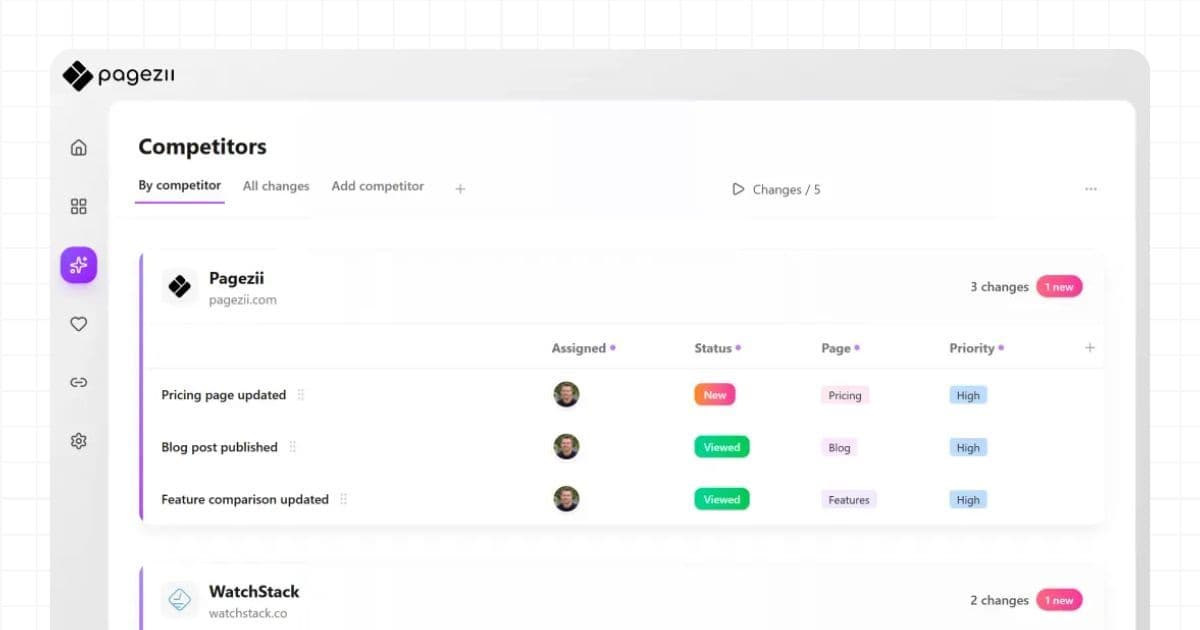
The weekly summary compiles all changes detected across your tracked competitors during the previous week. Each change is categorized by page type, summarized in plain language, and prioritized. You can review everything that happened across all competitors in under 10 minutes.
For most teams, week two is when the first genuinely useful signal appears. A competitor who updated their features page to add a new integration. A competitor who published two blog posts in the same week on a topic they have not covered before. A competitor whose homepage messaging shifted from one primary audience to another.
None of these require immediate action. But all of them are worth knowing. And the weekly summary means you know them without having to check anything yourself.
Week Three: Catching a Change That Matters
By week three, most users have caught at least one change that has a direct business implication.
The first meaningful alert is the moment the tool pays for itself. Detection to team briefing in under an hour is the standard you are aiming for.
In a realistic scenario, this looks like: a competitor pricing alert arrives on a Wednesday afternoon. The pricing page changed overnight. You open the alert, see the summary, and spend five minutes understanding the change. The entry-level tier dropped by $20 per month. You send a Slack message to your sales team before their Thursday demos. They go into those conversations prepared.
That is a complete loop from detection to action in under an hour. Without automated monitoring, the same scenario plays out differently: you find out during a sales call, you have to follow up, you lose momentum in the deal.
For context on what specific pricing changes signal and how to respond, read competitor pricing change alerts.
Week Four: First Report and Team Sharing
By week four, you have enough change history to generate a meaningful per-competitor report. The report covers all changes detected during the month, organized by page type and date. It includes AI-generated summaries and, in the Growth and Pro plans, is exportable to PDF.
The first time you share this report with your team — in a product review, a sales meeting, or a leadership sync — is usually when the tool's value becomes visible to people beyond the one person who set it up.
A one-page PDF showing four weeks of competitor changes, organized and summarized, is more useful in a team conversation than a verbal update from memory. It gives the conversation structure and focus.
What to Expect at 60 and 90 Days
At 60 days, the change history is long enough to start identifying patterns. A competitor who has changed their pricing twice in 60 days is likely still experimenting with packaging. A competitor whose blog output has tripled is likely investing in content as a growth channel. These patterns are only visible with consistent, historical data.
At 90 days, the monitoring system is embedded in your team's workflow. Weekly summaries are expected, not novel. Alerts are acted on, not read and forgotten. The competitor intelligence has influenced at least a few real decisions.
For teams who want to understand the full cost of what they were doing before, read the real cost of manual competitor tracking.
For a look at how to get the most out of competitor signals for your product roadmap, read competitor monitoring for product roadmap protection.
Automated competitor tracking pays for itself the moment you catch one move you would have missed manually — and most teams hit that in week three.
About the Author

Anika Patel
Customer Support
Anika Patel
Customer Support
Anika helps Pagezii users with quick support, resolving issues and guiding users through the platform’s features and tools.
Frequently Asked Questions
Most users have Pagezii set up and tracking their first competitors within 10 minutes. You add competitors by URL, select pages to monitor, and automated competitor tracking begins building a baseline. First alerts typically arrive within 24 to 48 hours.
Audience Context
For teams evaluating Pagezii before committing. They care about concrete proof of value, not feature lists — this shows them exactly what 30 days produces.
Related Insights
- Competitor Pricing Change Alerts: Act the Same Day — Turn pricing alerts into sales team briefings
- Competitor Monitoring for Product Roadmap Teams — How product leads use weekly signals
- The Real Cost of Manual Competitor Tracking — Why the old process costs more than $29/month
- Replace Your Competitor Tracking Spreadsheet — Migrate from spreadsheet in under a day
References
- Canadian Marketing Association. (2024). AI-powered competitive intelligence: CMA AI playbook. Canadian Marketing Association.
https://thecma.ca/docs/default-source/default-document-library/CMA-AI-Playbook_AI-Powered-Competitive-Intelligence.pdf - Gupta, M., George, J. F., & Xia, W. (2021). Big data analytics in building the competitive intelligence of organizations. Information & Management, 58(3), 103384.
https://www.sciencedirect.com/science/article/abs/pii/S0268401220314304 - ChangeTower. (2024, October 27). Competitive intelligence monitoring with AI: Benefits and drawbacks.
https://changetower.com/competitive-intelligence-monitoring/ - Kompyte. (2023, September 18). Real-time competitive intelligence: When timing is everything.
https://www.kompyte.com/blog/real-time-competitive-intelligence - Northern Light. (2026, March 3). Competitive intelligence case studies: Decision-ready intelligence at scale.
https://www.northernlight.com/competitive-intelligence-case-study
Disclaimer
This article is provided for informational purposes only. Pagezii aims to share practical insights on competitor tracking and market intelligence but does not guarantee completeness, accuracy, or specific business outcomes.